Passkeys, not passwords
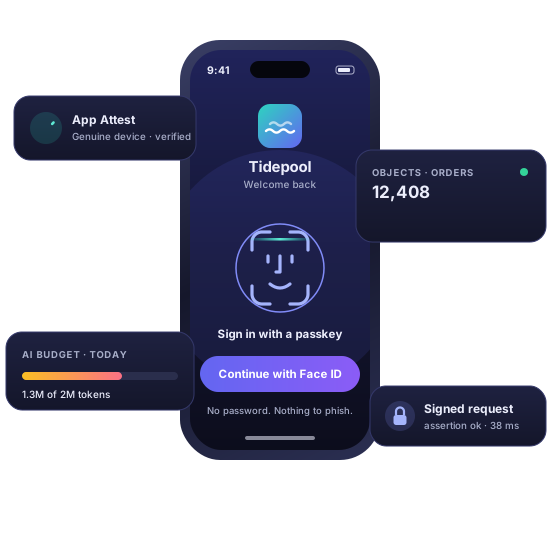
Sign people in with Face ID and a hardware credential. No password field, nothing to reset, nothing to phish, and no password database for you to be responsible for.
 PierKit
Built for iOS
A backend for iOS apps, without the backend
Every app needs the same server, and every team writes it again. PierKit is that server, finished: sign-in, files, your own data model, limits and analytics, configured rather than coded. There is nothing to deploy, nothing to scale and no schema migration to write at midnight.
register your application → add the package → ship
You are not standing up a service, choosing a database or picking a hosting region. You are registering an app and adding a dependency to it.
Your bundle identifier and your Apple team, entered once, with development and production kept strictly apart. Adding an app is a row, not a deploy, and the same is true of every limit and every setting on it afterwards.
One Swift package. On first launch it creates a hardware-backed key, enrols itself and is ready. No API key to paste into your source, no secret to rotate, nothing to keep out of source control.
Sign people in, store their data, upload their files, query the lot, and read the numbers back. Everything in the next section is already running. You are turning it on, not building it.
The console
Your people, installs, objects, files, events and AI spend, readable at a glance by the people who run the app, and every change they make written to an audit log nobody can edit.
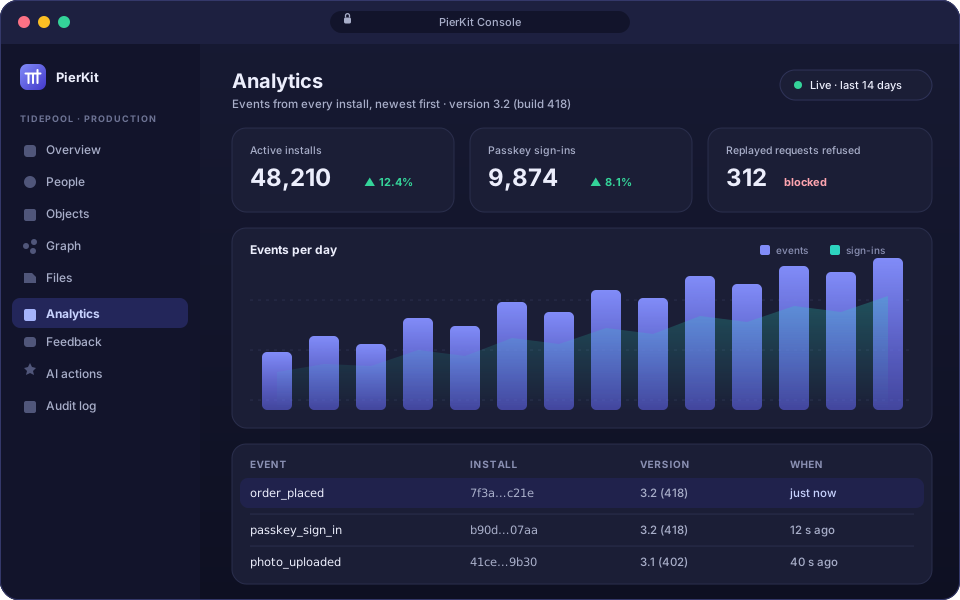
Not a framework to fill in. Each of these is a working service with its own rules, its own audit trail and its own place in the console.
Sign people in with Face ID and a hardware credential. No password field, nothing to reset, nothing to phish, and no password database for you to be responsible for.
Each install proves to Apple that it is your real app on genuine hardware, and then signs every call that matters. A captured request cannot be replayed and an altered one is refused.
Per-device signals that survive a reinstall, so an abusive device stays known. Ban it, or lift the ban, from the console, one install at a time, with no release going out.
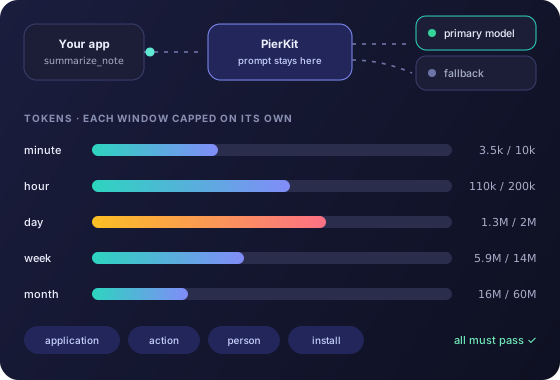
Per app, per install, per signed-in person and per address, enforced where the decision is made rather than at the edge. Raising one is an update, not a deploy, and losing the shared counter weakens a limit without ever removing it.
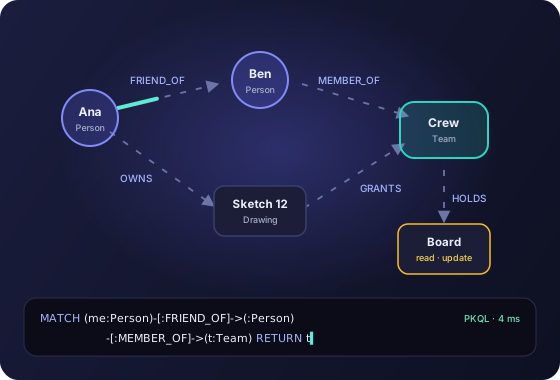
Describe a type as a JSON Schema and it exists, validated on every write, owned by the caller the server verified rather than the one the app claimed. Reads are filtered and paged, and a query the design cannot serve quickly is refused rather than served slowly.
Join people, installs and records with typed, directed edges. Each edge carries read, create, update, delete and grant, and can never hand on more than it holds.
Who may read a record is a short walk through your own data (friend of, member of, owner of), declared once and evaluated in one statement, with nothing cached. Remove an edge and the next request already knows.
PKQL asks Cypher-shaped questions of the graph; PKSQL reads a type as if it were a table. Both are read-only and both run in the console today, where you explore your data without writing a line of app code.
Bytes never pass through PierKit: it decides and signs, the device uploads straight to storage. A file is public behind a CDN, readable by any install of your app, readable by its owner alone, or by no client at all, and the unpublic ones are served over links that expire.
One call from inside your app puts a report in a queue your team works in the console, with the install it came from attached. No third-party SDK, and no support inbox to wire up.
Send events in batches and read them back in the console, newest first, tagged with the version and build they came from. Named events with your own parameters, tied to installs rather than to people you would rather not follow around.
Designed in full and written down, not yet running. Here because it is what PierKit is becoming and the shape is already settled, not because you can call it this afternoon.
Your own object types behind one read-only GraphQL endpoint, so a screen can ask for exactly the fields it needs in a single round trip instead of four.
Point Claude Code (or any tool that speaks MCP) at your PierKit application, and it can read your types, your data and your settings while it writes your app. A backend your assistant understands, rather than a black box it guesses about.
Your app asks for a named action. The server decides which provider and which model answers it, and what that answer is allowed to cost. No model name in your binary, so you change model (or change vendor) without shipping a release, and one stolen request cannot become unbounded spend.
A small browser interface for the people who run the app, behind passkeys, on its own hostname. Every action it can take is written to an audit log that nobody can edit.
The guarantees on this page come from Apple's hardware: App Attest, DeviceCheck, the Secure Enclave. A backend that also served Android would have to fall back to a shared secret, and then nothing above would be true.
One process and one Postgres database as the system of record, with an optional cache that may disappear without changing an answer. You do not run it, but you can know what it is.
The backend stopped being the interesting part of your app a long time ago. Sign-in, uploads, a data model, limits, moderation, analytics, an AI budget: every team builds the same one, badly, on the way to the thing they actually wanted to make. PierKit is that work, done once, properly, and turned on with a row in a table.